
Teacher's Console Update Oct 17th 2021

Oct 17, 2021
What's new in Console update 1.64.6.x#
- Highlight cards on the students end
- Run quick polls.
Highlight cards on the students end#
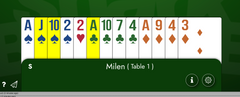
On the teacher's table you can press and hold the "H" key and click on a card, the card will be highlighted on the students end, the card is also always turned face up. To clear the highlight of a card, you can hold the "H" key and left click on the card, or you can hold the "R" key and click on any card to remove all highlights. When you load/reload a hand all highlights are removed.
Polling#

This was requested by the BridgeWhiz program. It is a useful tool to ask quick questions and get more participation from your students, especially in large groups when everyone is muted. Click Here for instructions on how to run and save canned polls.
Related posts
Game-Day™ runs as a month-long challenge. Earn free SB credits by playing our regular Masterpoints® Games, collectingmonthly badgesand finishing hi...
Jun 10, 2026

A Step-by-Step Guide to Using Your Shark Account and Connecting It to Your ACBL Account Our new login system makes it simpler and more secure to ac...

Jul 31, 2025

Shark Bridge Console version 1.64.12.1 brings private duplicate games in the form of 1 human + 3 robots. Those games can be scheduled to run for m...
Mar 28, 2023